








How to find my Apple ID email address if I chose "Sign in with Apple"?
Created 6 years ago Updated 10 months ago
You'll need your hidden Apple email address to sign in to https://www.playgwent.com/.
To check your Apple email address, follow the steps below:
- Open Settings.
- Select your name.
- Select Sign-in & Security.
- Select Sign-in with Apple.
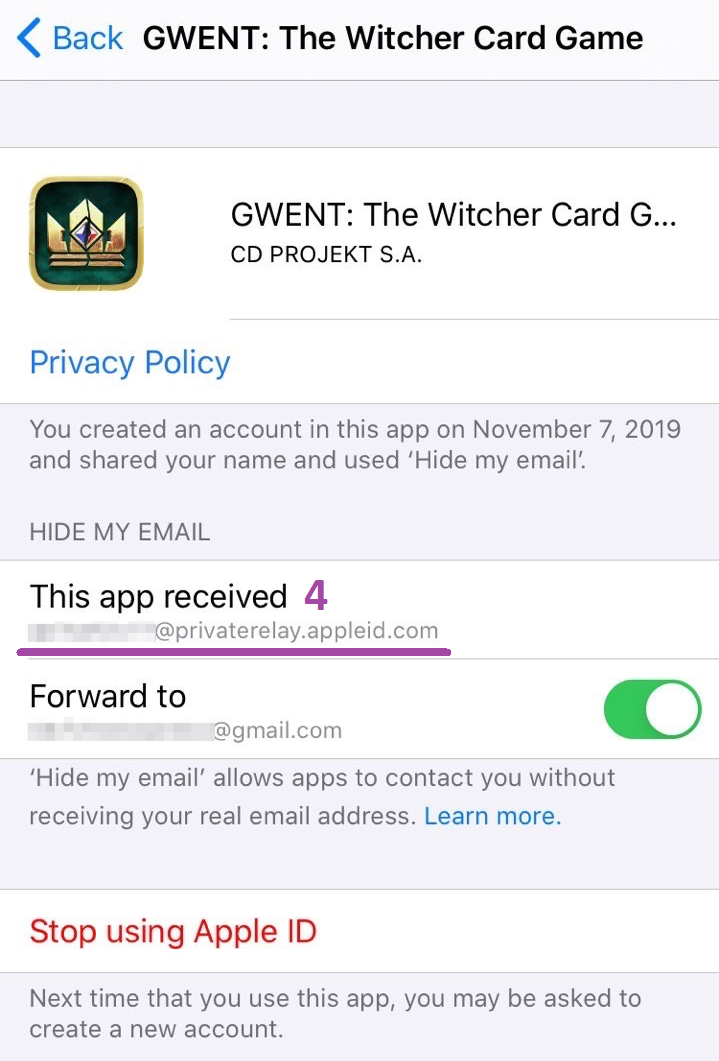
- Select GWENT: The Witcher Card Game.
- Your Apple email is visible under HIDE MY EMAIL.
For more information on how to manage the apps you use with Apple Sign in, check this article: Manage your apps with Sign in with Apple.